
OrderUp
OrderUp
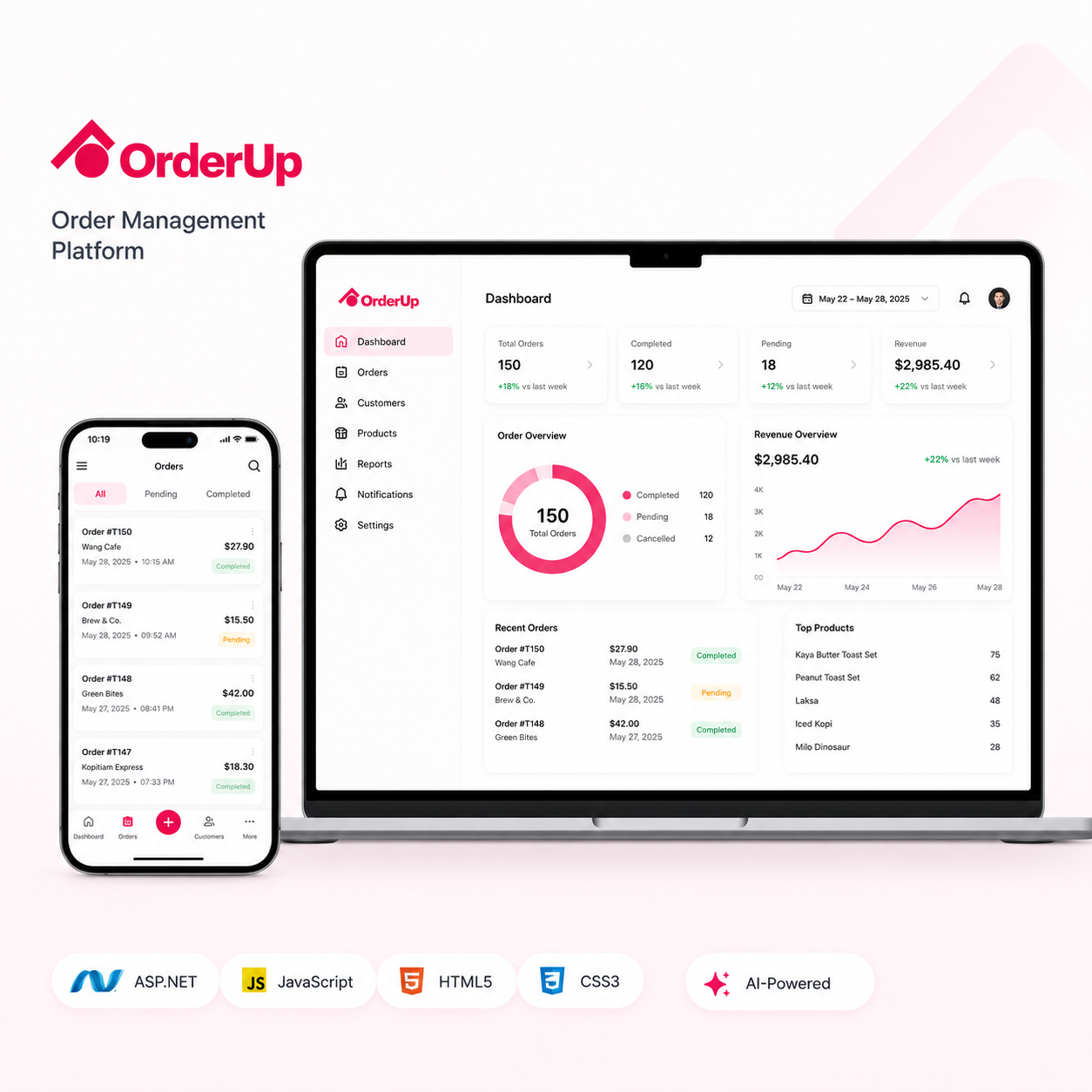
OrderUp is a web-based order management system designed to help businesses manage customer orders, inventory, and fulfillment from one centralized platform. The system allows administrators to review incoming orders, update order information, monitor inventory availability, and follow fulfillment progress. Real-time data synchronization helps ensure that sales and inventory records remain consistent across connected systems. Its user-friendly interface gives operational teams clear visibility into order activity and reduces their dependence on spreadsheets, manual records, and repeated communication. The platform also provides a structured foundation that can support increasing order volumes as the business expands.
The client required a centralized solution for businesses that manage customer orders, inventory records, and fulfillment activities. Their objective was to replace disconnected or manual processes with a reliable system that could provide accurate information throughout the order lifecycle. The platform needed to support daily operational activities while remaining simple enough for administrative teams to use without extensive technical knowledge. Integration with existing sales and inventory systems was also important for maintaining consistent and up-to-date business data.
Challenges faced by OrderUp

Centralizing orders from different sales channels
Maintaining accurate inventory information
Preventing overselling and stock-related errors
Tracking orders throughout the fulfillment process
Integrating with existing sales and inventory systems
Providing real-time operational updates
Simplifying administrative order management
Improving coordination between business departments

Key Features
Centralized Customer Order Management: Customer orders from connected sales channels are recorded in one system so teams can review, update, and track them throughout the lifecycle.
Order Creation, Viewing, Editing, and Status Updates: Administrators can create, view, and edit orders, then update statuses as work moves from receipt through processing and completion.
Real-Time Inventory Tracking: Inventory information can be updated when orders are processed, helping teams reduce stock discrepancies and prevent unavailable items from being sold.
Product Availability and Quantity Monitoring: Administrators can identify low-stock products and coordinate replenishment with a centralized view of available quantities.
Automated Fulfillment Status Tracking: Order statuses show which orders are new, being prepared, dispatched, completed, or require attention.
Integration with Existing Sales Systems: Orders received through connected sales channels are recorded centrally to reduce duplicate data entry.
Integration with Inventory Management Systems: Inventory synchronization keeps sales and stock records consistent across connected business systems.
Customer Information Management: Customer records stay connected to orders so teams have the latest customer and order information when making operational decisions.
Final Outcome & Impact
Centralized Order Management
Improved Inventory Accuracy
Faster Order Processing
Reduced Fulfillment Delays
Better Operational Visibility
Fewer Manual Data Errors
Improved Team Coordination
Scalable Business Operations
Managing orders and inventory through separate systems can create stock inconsistencies, duplicated records, fulfillment delays, and communication gaps between departments.